Meeting Control
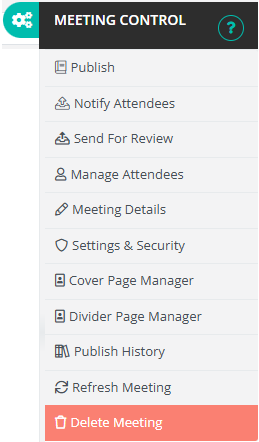
This image shows the Meeting Control menu, represented by the cogs or gear icon located at the top right of your screen (just to the right of the log out button). The Meeting Control menu appears only when you are viewing a specific meeting page, as it contains settings and actions related to that particular meeting.
To explore the options available, simply click on the menu item below that you would like to learn more about. Each action provides tools for managing different aspects of the meeting, from editing details and attendees to publishing or deleting the meeting.