
Enable Auto Minutes
BoardCloud's Auto Minutes feature automatically transcribes your meeting and uses the transcription and associated meeting information to create a formal minutes document.
By providing the meeting link and checking the box our meeting bot, Gladis, will be invited to attend your meeting to take minutes.
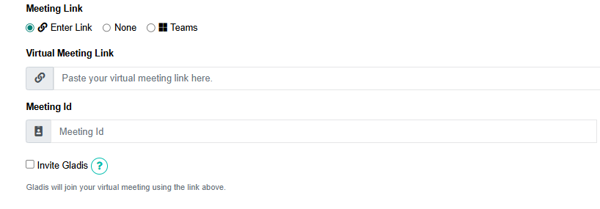

When invited Gladis will:
- Join the meeting at the scheduled time using the meeting link provided.
- Record the meeting.
- Automatically produce a transcript of the meeting, which will be available on your Transcriptions page.
- Generate draft minutes using the meeting transcript, agenda, attendance list, voting results, and tasks assigned during the meeting.
Confirm Invite
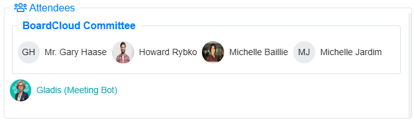
When auto minutes have been enabled Gladis will now appear in the list of meeting attendees found on the Meeting Page.
Important!
Gladis must be admitted to the meeting before she can record and transcribe it.
If she is left in the waiting room, she will be unable to perform her job.