
Restricted Documents
Restricting Document Access in BoardCloud
Sometimes you may need to restrict access to sensitive documents so that only certain members can view them. Documents can be Excel, PDF, Word, or PowerPoint files.
To Restrict Access
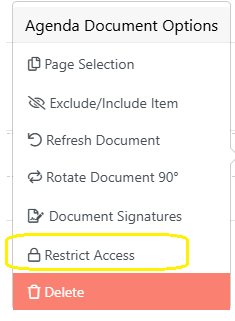
- Click the three dots (⋮) on the right-hand side of the document.
- Select Restrict Access.
- A pop-up will list all meeting attendees.

- Select the members who should NOT be able to view the document.
- Click Finish.
- In the confirmation pop-up, click Confirm.
The document will now appear in red and show the restricted members.

How Members Who Are not Restricted Can View The Documents
Restricted documents will not appear in the board pack at all for any members, including admins. This ensures that sensitive information is only visible to authorized members, exactly as intended by BoardCloud.
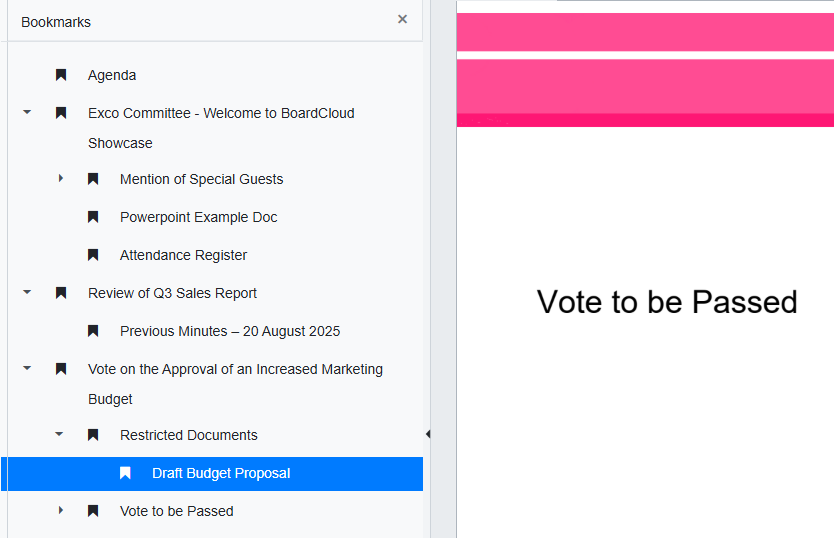
Members with permission must click the document in the agenda to open it.
To Remove Restricted Access
To remove restrictions, the restricted members must be removed by deleting and re-uploading the document.