
Icons on the Form Register Dashboard
Icons on the Form Register Dashboard
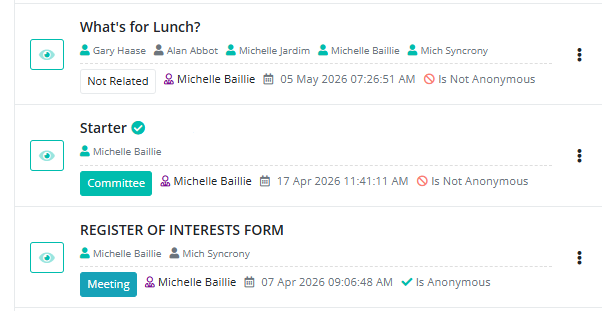
Eye icon
View a preview of the form.
Dark green “Meeting” tag
This form is linked to a specific meeting. Click it to open that meeting.
Light green “Committee” tag
This form is linked to a specific committee. Click it to open that committee.
White “Not Related” tag
This form is not linked to any meeting or committee. It is mainly used for organization-wide forms.
Name with grey person icon
The member has not completed the form yet.
Name with green person icon
The member has completed the form.
Name with purple person icon
The creator of the form.
Calendar icon
Shows the most recent date the form was created or edited.
Green check mark next to the form name
The form has been completed by all assigned participants.
No entry icon (circle with a line through it)
The form is not anonymous.
Green check mark
The form is anonymous.