
Tracking Responses
Track Responses
BoardCloud allows you to monitor form activity in real time, giving you full visibility over who has completed a form and who has not.
The Form Register is where you can track these responses.
Viewing response status
You can easily see:
- Which users have submitted responses
- Which users are still outstanding
- Overall completion progress
This is particularly useful for governance and compliance processes.
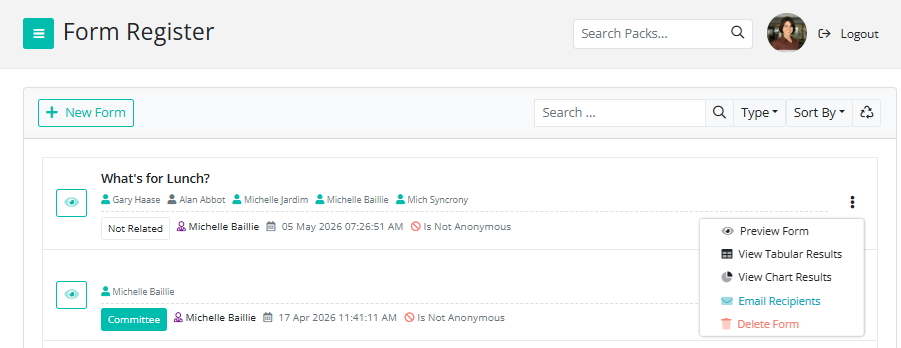
How to see who has responded

As shown in the image above, the green person icon indicates that the member has completed the form. The grey person icon indicates that they have not yet completed it. You can learn more about the other icons here.
Exporting responses (Excel/PDF/CSV)
You can view the results on the portal or download them in a few different formats. Learn more about that here.
Following up with users
Resending the form to non-responders only
- Identify non-responders
- Resend the form where necessary
To resend the form, simply click the three buttons on the right-hand side of the form name and select Email Recipients. Please note that this will bring up the full list of members who need to complete the form, not only those who have not yet completed it.
Record keeping
All responses are securely stored within BoardCloud, providing a centralized record of submissions and an audit trail for governance purposes.