
Managing Resolutions
Managing Resolutions
The eResolution Dashboard allows you to manage your resolutions easily. From the dashboard, you can view the resolution details to see its current status and information.
You can also revoke a resolution if it is no longer required or needs to be withdrawn, or delete a resolution if it was created in error or is no longer needed.
Viewing Resolution Details
Click View Details (the three dots to the right of the resolution), or click the resolution itself to open the Resolution Details window.
This screen provides a complete overview of the resolution and its signing progress.
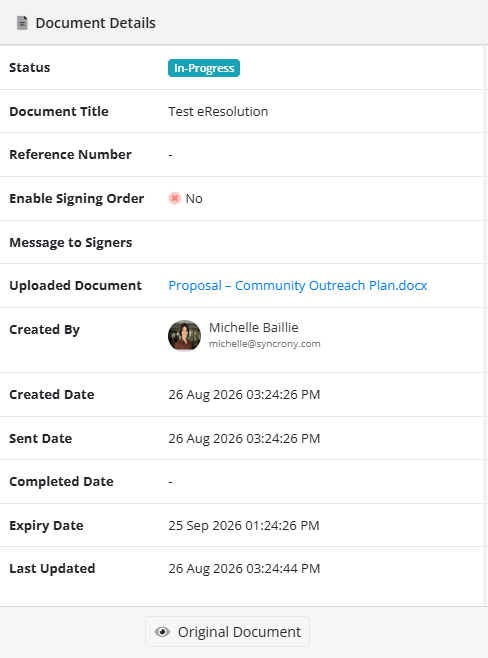
On the left-hand side, you can view the document details, including:
- Status: Can be In-Progress, Expired or Declined
- Document Title: The name of the document
- Reference Number: Optional reference number
- Enable Signing Order: Can be Yes or No
- Message to Signers: Optional message to the signers
- Uploaded Document: Original document's name
- Created By: The admin who created this eResolution
- Created Date: Date this eResolution was created
- Sent Date: The date the eResolution was sent out for signatures
- Completed Date: The Date all the signers have completed signing
- Expiry Date: The date the document cannot be signed anymore
- Last Updated: The last date and time someone interacted with the document
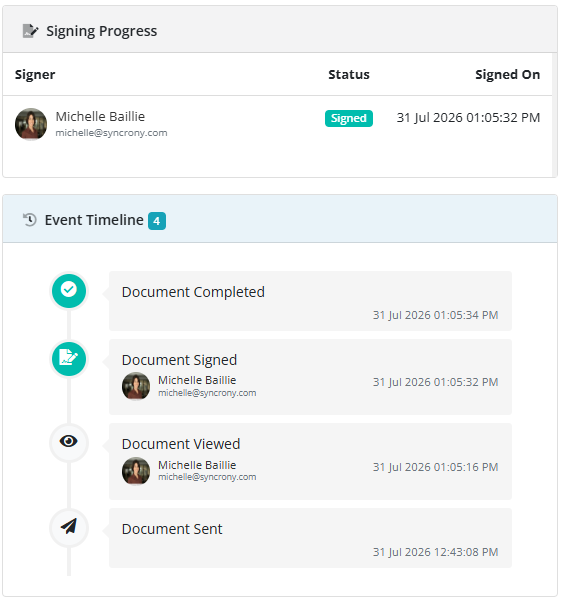
On the right-hand side, you can monitor the signing process using:
Signing Progress: Displays the status of each signatory.
Signer: Lists the first names, last names and email addresses of the signers
Status: Whether or not the person has signed, declined, or not yet signed
Signed On: Date and time the document was signed
Event Timeline: Records all activity relating to the resolution, including when requests were sent, viewed, signed, or completed, from latest to first. It shows in brackets how many events there were.
Possible Events:
- Document Completed
- Document Declined
- Document Viewed
- Document Sent
- Document Expired
Each event will display:
- Name of member
- email address of member
- date and time it occurred
As signatories view and sign the document, the Signing Progress and Event Timeline sections are updated automatically. Once all required signatures have been completed, the resolution status will change to Completed on both the Resolution Details window and the main Resolutions page.
Revoke
A resolution might be revoked for several reasons, for example:
- An error was discovered in the resolution wording.
- The resolution is no longer required.
- New information has come to light.
- The wrong resolution was sent to members.
- The board decided to withdraw it and replace it with an updated version.
- Circumstances changed before the resolution was completed.
Delete
You can delete a resolution if it was created in error or is no longer needed.
Please note: deleting a resolution is permanent and cannot be undone.