
Delete Members
Delete Members
BoardCloud allows administrators to manage member access in two phases:
- Deactivate Member (Soft Delete): removes access and stops emails.
- Hard Delete: permanently hides the member from the system while preserving historical records.
This guide explains both steps and what happens after each action.
Remove them from committees if needed.
Deactivate Member (Soft Delete)
When a member is no longer part of your organization, the first step is to deactivate their account.
Before starting, confirm the following:
- The member is currently Active
- The member’s email address is Confirmed
Below is an example of an active member record as seen on the Manage Members screen:

How to Deactivate a Member
- Go to Admin → Manage Members.
- Select the member you wish to remove by clicking the pencil icon on the left-hand side.
- In the right-hand navigation panel, under the member's profile picture, click Deactivate Member.

This immediately prevents the member from logging in, stops all system-generated notification emails, and marks the member’s email as Non-Active.
After Deactivation
A deactivated member will still appear in the Manage Members list, but:
- Their email will be tagged Non-Active
- They will not receive any notifications
- If they belong to a committee, they will appear as Unverified and be highlighted in red

They also cannot log in, cannot open board packs and cannot access historical documents or meetings.
Can a Member Be Reactivated?
Yes. A deactivated member can be reactivated at any time.
Simply open their profile and select Reactivate Member.
Hard Delete
Once a member has been deactivated, the system will replace the previous option with a new one on the right-hand panel:
Delete Member (Hard Delete)
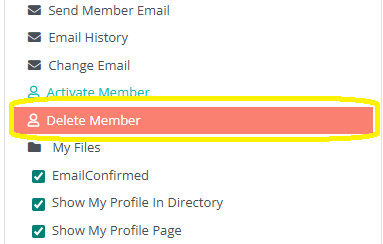
A hard delete removes the member from all active views, makes the member invisible to all administrators and users, and permanently ends the member’s presence in operational parts of the portal.
However, the member’s data is not fully erased.
Technical Notes About Deleted Members
Deleted members are not completely removed from BoardCloud. Instead, they are placed into a secure, hidden state to protect:
- Historical attendance records
- Voting results
- Tasks assigned or completed
- Board pack annotations
- Meeting participation
- Any audit-related data
This is essential for:
- Governance
- Compliance
- Reporting accuracy
- Long-term record integrity
If a user were removed entirely, all related records would become orphaned, which can compromise your portal’s data accuracy.